
A process engine, and everything it needs around it
Map how your procedures unfold — steps, roles, approvals, transition rules — and let bxFlow execute them. Your existing software is queried along the way, whenever a step needs it.
What bxFlow does
Connecting your software
Your old and new software finally exchange data.
Gateway between existing systems (SOAP/WSDL/XML) and modern applications (REST/JSON APIs).
Flow orchestration
Information follows the right path, from one tool to another, automatically.
Configurable integration pipelines to transform, route and harden data exchanges.
Process engine (workflow)
Your internal procedures run step by step, to the right people.
BPM workflow engine: steps, roles, approvals and business rules orchestrated end to end.
Automatic request intake
An email or a form comes in and triggers the right process on its own.
Automatic ingestion via API and email, triggering the associated workflows.
Automated document reading
The useful information in a document is extracted with no manual entry.
Automatic processing of attachments to extract and pre-fill a file’s fields (invoices, forms, letters and other documents).
Document generation
Your letters and certificates come out filled in, on your own letterhead, in one click.
The customer uploads THEIR own Word or Excel template and places tags in it; everything the tags do not touch is preserved — letterhead, logo, styles. One document, or a mail merge over a selection of cases.
Bulk handling
A thousand cases can be created, moved forward or exported in a single operation.
Import template generated from the process fields (Excel or CSV), row-by-row report, bulk step transition and export over a selection — with caps and an expected count, so nothing runs blind.
Automations
Actions fire on their own: at a step, on a date, or when a condition is met.
Post-functions on entering a step or crossing a transition, scheduled rules, form behaviours (fields shown, hidden or locked depending on what is entered), email and SMS notifications.
Business reference data
Your customers, suppliers or branches live inside the tool, kept up to date.
Records replicated from a source system at a regular interval, selectable inside a case, copied into its fields — and able to open a case when an attribute changes (“customer moved to high risk → KYC review”).
Tracking and traceability
You see in real time where each file stands.
Full logging of steps, history and a tracking dashboard per file.
The product, screen by screen
Captured from the application on demonstration cases. The day-to-day screens first, the configuration ones after. People, clients and amounts are fictitious.
What your teams see
No technical skill required: open a case, fill it in, move it along, follow it. That is everything a case handler needs to know in order to work.
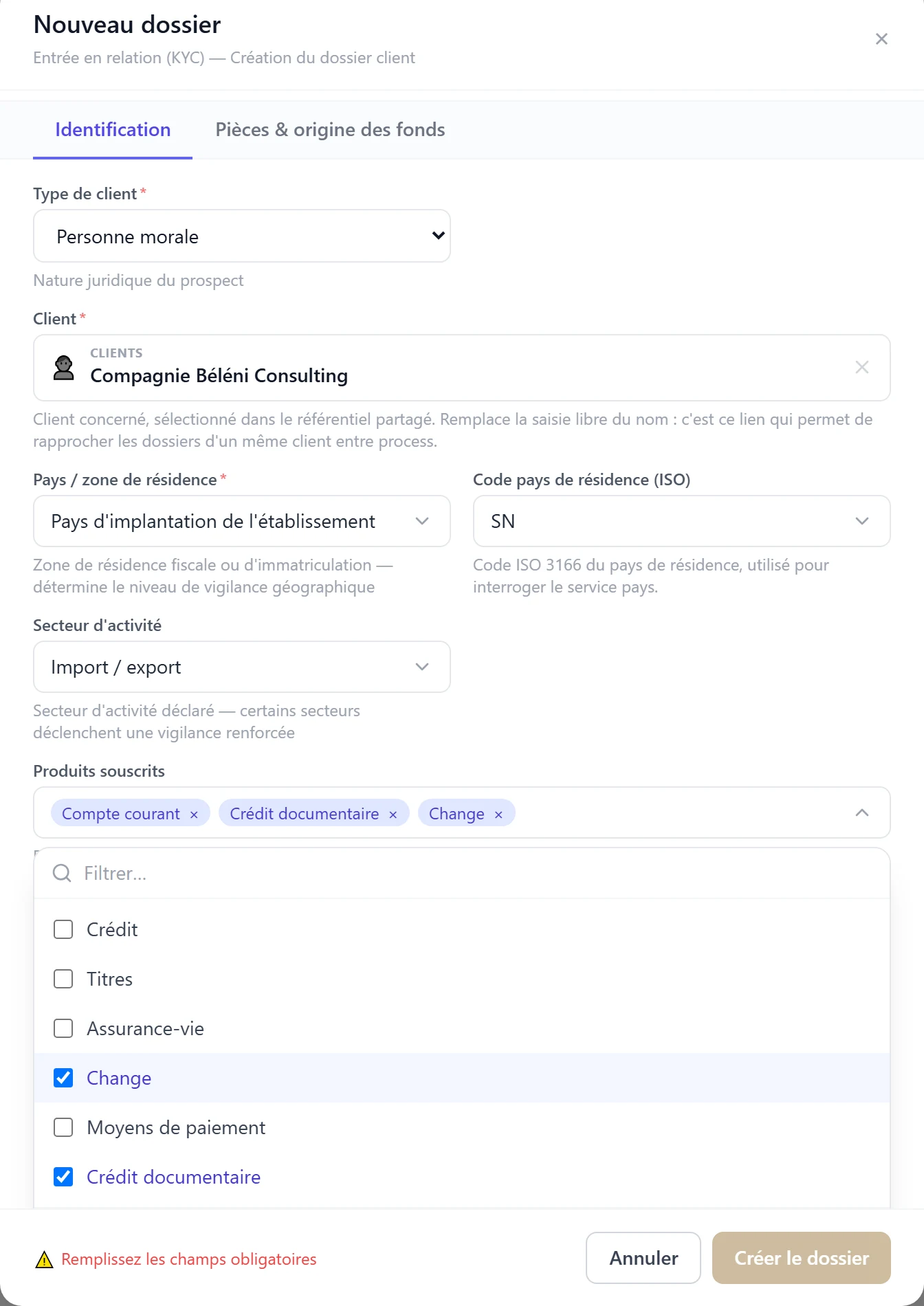
Guided data entry
Closed lists rather than free text: the client is picked from the shared reference data, every case can be sorted and compared, and required fields are checked before submission.
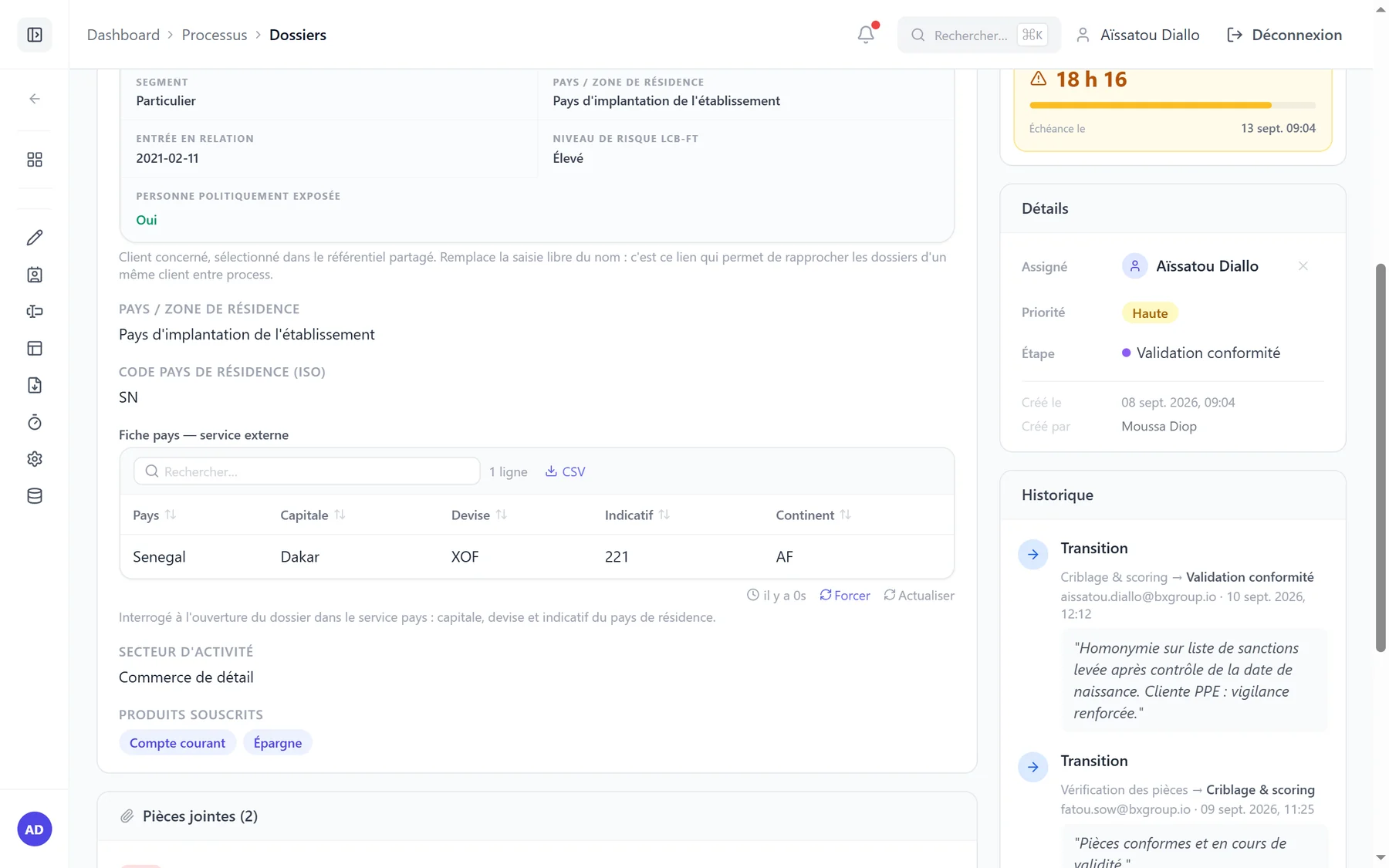
A case that queries your systems
When the case opens, the country record is read from the external service using the ISO code entered: nothing is retyped by hand.
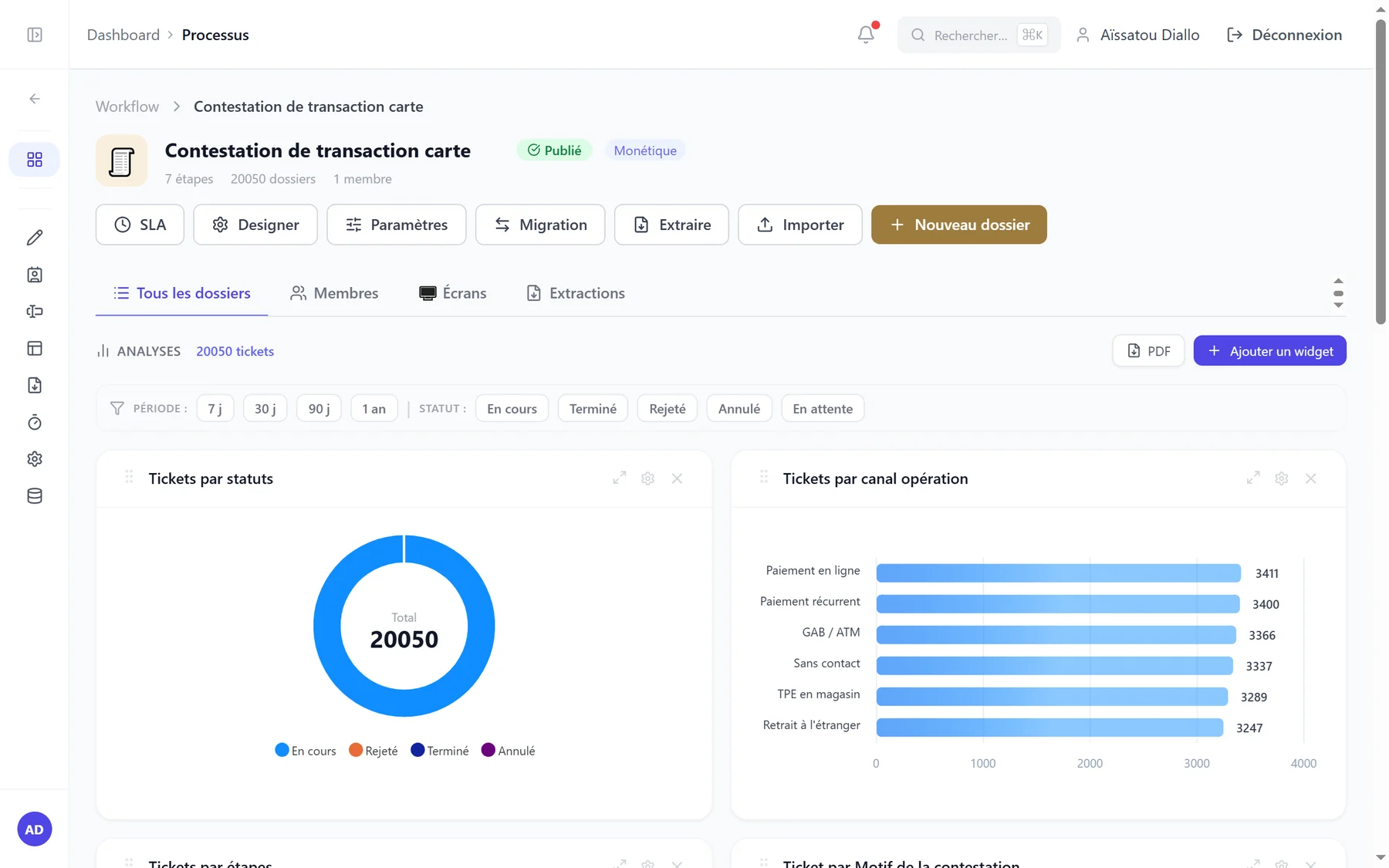
Live oversight
Over 20,000 card transaction disputes, broken down by status and by channel.
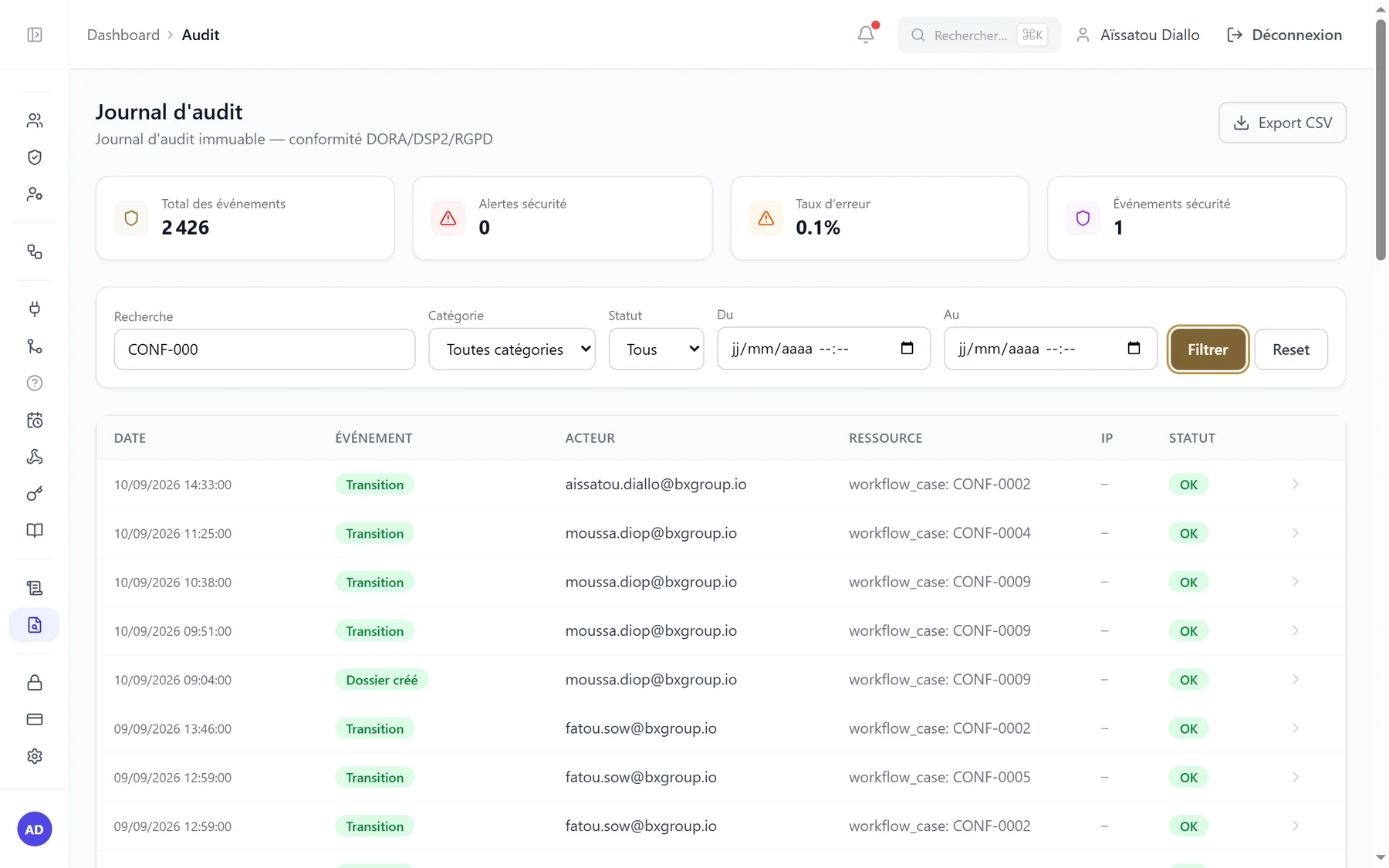
The audit log
Every action, its author and its date, filterable and exportable for an inspection.
What the person who configures it sees
The process, the links to your existing systems and the shared reference data are all set up inside the application, without writing a line of code. These screens open only to the people entitled to them: an organisation with no technical team never has to visit them.
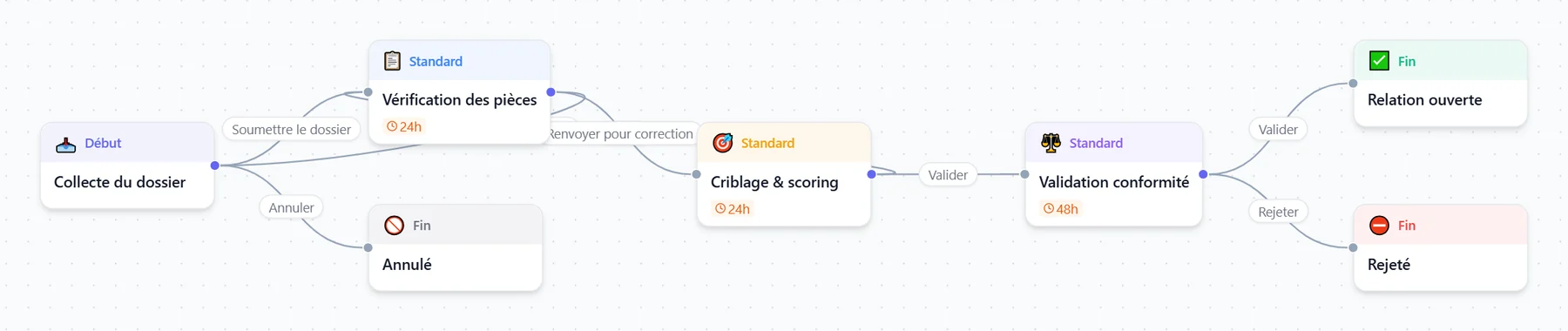
Onboarding, drawn
From the submitted file to the opened relationship, with return for correction and reasoned rejection — the very path the screens above follow.
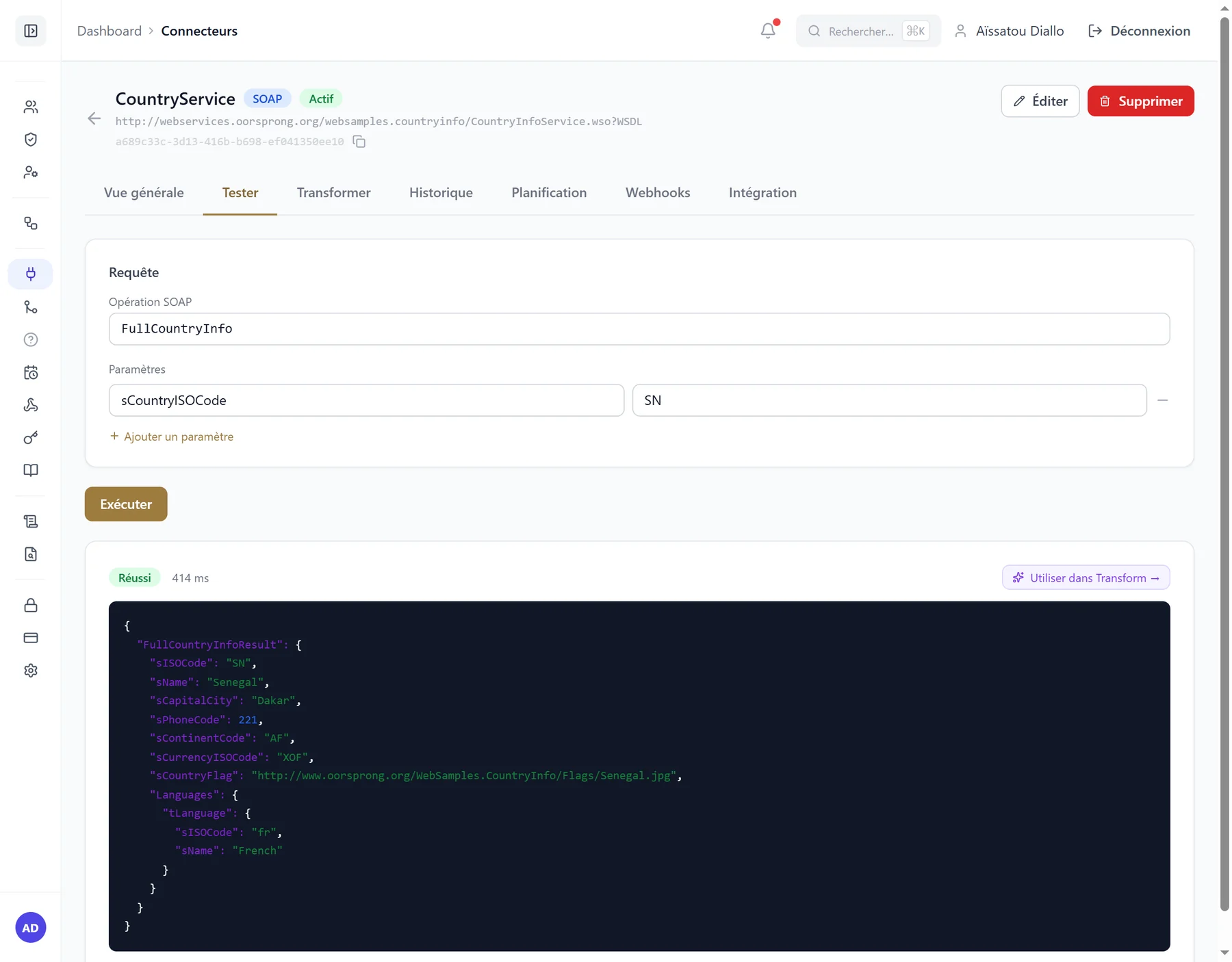
An existing system, queried
A real SOAP service called from bxFlow: the XML response comes back as JSON, ready to fill in the fields of a case.
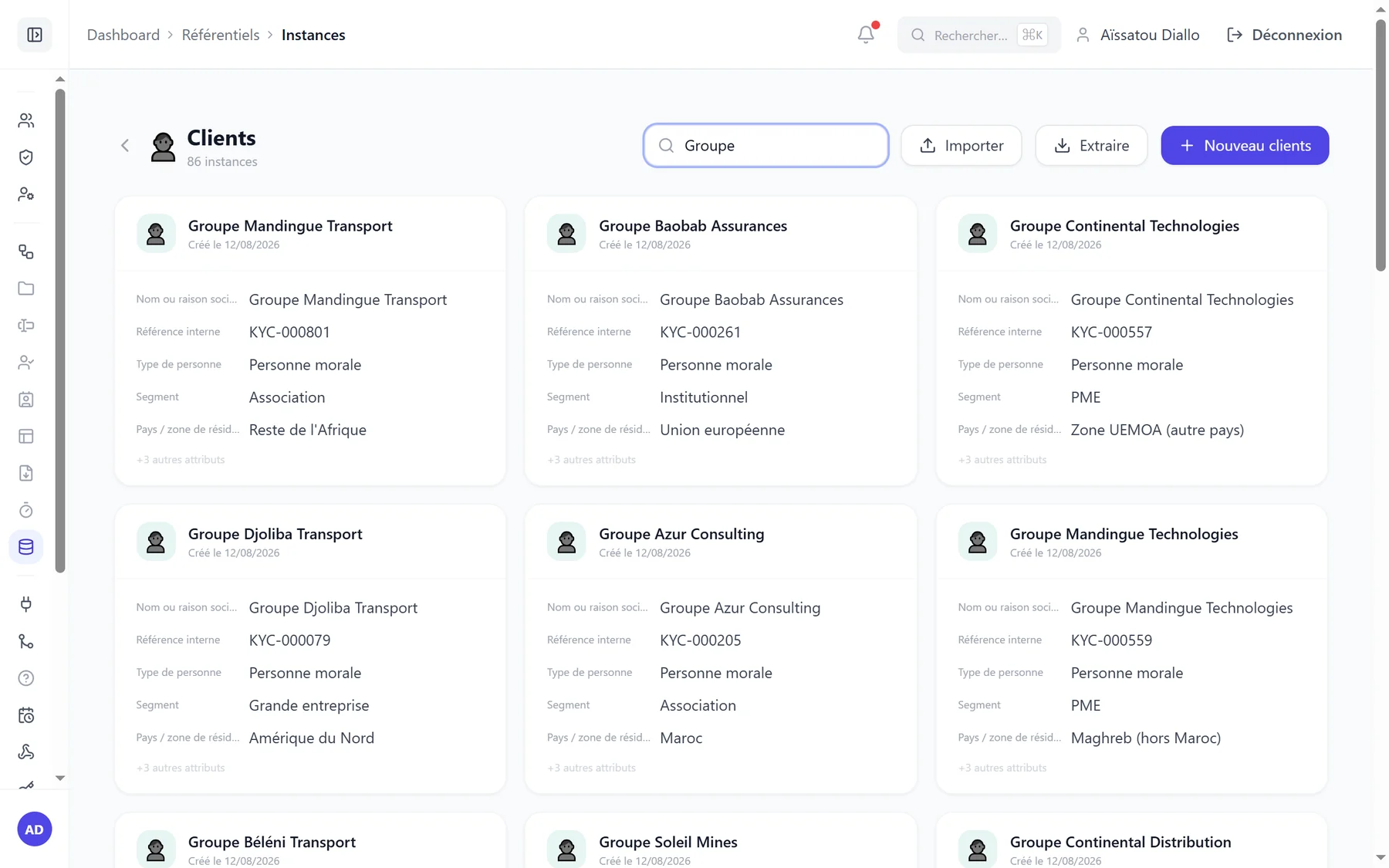
Shared reference data
Clients, suppliers, branches: records shared by every process, typed in by hand, imported from a CSV file or kept up to date by a connector.
What other tools sell as add-ons
Most process platforms cover the flow itself and stop there. The moment you need a table inside a form, a value pulled from the core banking system, or a letter on your own letterhead, you buy an add-on from a marketplace. In a bank that means one more licence, one more vendor to assess under third-party risk, and code you did not choose running in an environment your security team has to defend. These building blocks are part of the product.
Tables inside a case
One row per guarantee, per beneficiary, per document expected: the agent adds and removes rows in the form, using the columns you declared. An Excel file loads straight into it, and the table comes out as a table in letters and extracts.
Data from another system
A field that fetches its answer from your core banking system, your directory or your document store at the moment the agent needs it: a customer’s accounts, their outstanding balance, their branch. Nothing is retyped, so nothing drifts apart.
Reference data
Your customers, branches, products or suppliers live in the product, attach to cases and stay current from the source system. A changed attribute can open a case on its own: a customer moved to high risk triggers their review.
Reading attachments
An ID document or a supporting paper dropped into the case is read, and the recognised fields are offered for entry. The agent confirms: it assists data entry, it never decides in their place.
Letters and documents in your house style
You upload your own Word template, place tags in it, and the product fills them in: certificate, rejection letter, summary. Header, logo and styles are preserved, and a batch of cases produces a mail merge in one go.
Forms that react
A field that appears only when the previous answer calls for it, an amount that computes itself, a cell locked according to the role of whoever is looking. Written in an editor, executed in a sandbox.
Deadlines and reminders
Any step can carry its own deadline, with a reminder before it falls due and an alert when it is missed. Breaches are counted in a table — the first thing internal control asks for.
Bulk handling
A thousand cases imported from a file, two hundred moved through the same transition, a filtered extract handed back as Excel. With a line-by-line report of what went through and what did not.
All of this is switched on in configuration and follows the product at every release. No marketplace, no extra licence, no compatibility to re-check at each upgrade.
The principle, in one picture
A request comes in
Form, email or another system
The process unfolds
Steps, roles, approvals, rules
The case is handled
Traced end to end, with no manual chasing
At the centre sits your process: the flow you drew. Your existing software does not go away — it is queried along the way, at the step that needs it.
A word on automated reading
bxFlow reads a wide range of documents to pre-fill your files. The goal is never to replace your judgement, but to spare you repetitive entry and oversights. You always keep control of the final validation.
Interface languages
The application ships in French, English and Spanish. Each user picks their own; emails and messages go out in the language of the person receiving them, never that of the person triggering them. An additional language ships without bespoke development.
The brochure, to take with you
Eight pages: positioning, how it works, real screens, security and deployment, and the process catalogue. PDF, 1.8 MB — in French.